


Guardian Star

A daily check-in for anyone who lives alone

It checks on the people you love, every day.

Thirty seconds, with the app’s own screens. Not an emergency service.

1 of 5 · 0:00

Each day, one check-in

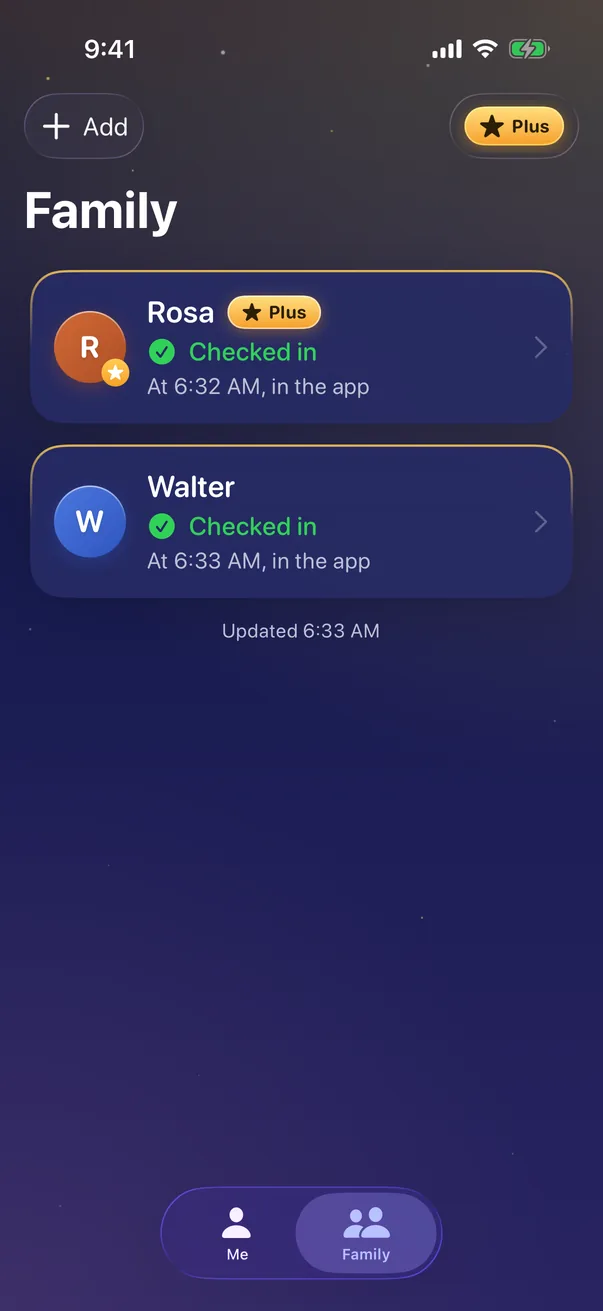
Most days their iPhone checks them in by itself, when they move about or use it in the hour before their check-in time. Or they tap “I’m OK”. You see it on yours.
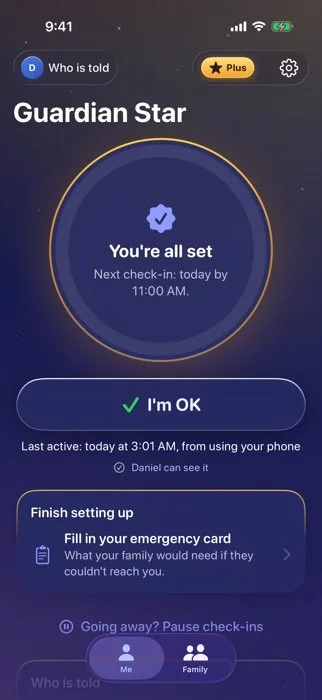
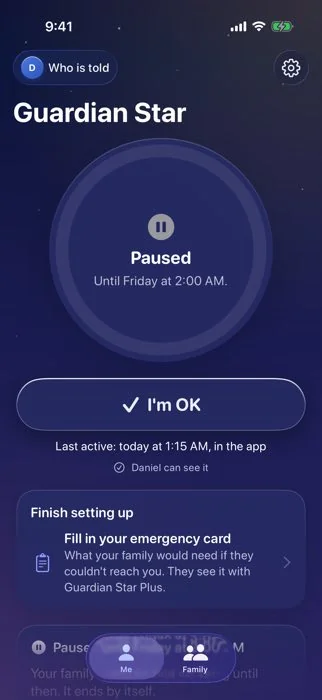
Guardian Star's main screen: You're all set. Last active today, from using the phone.
Their iPhone
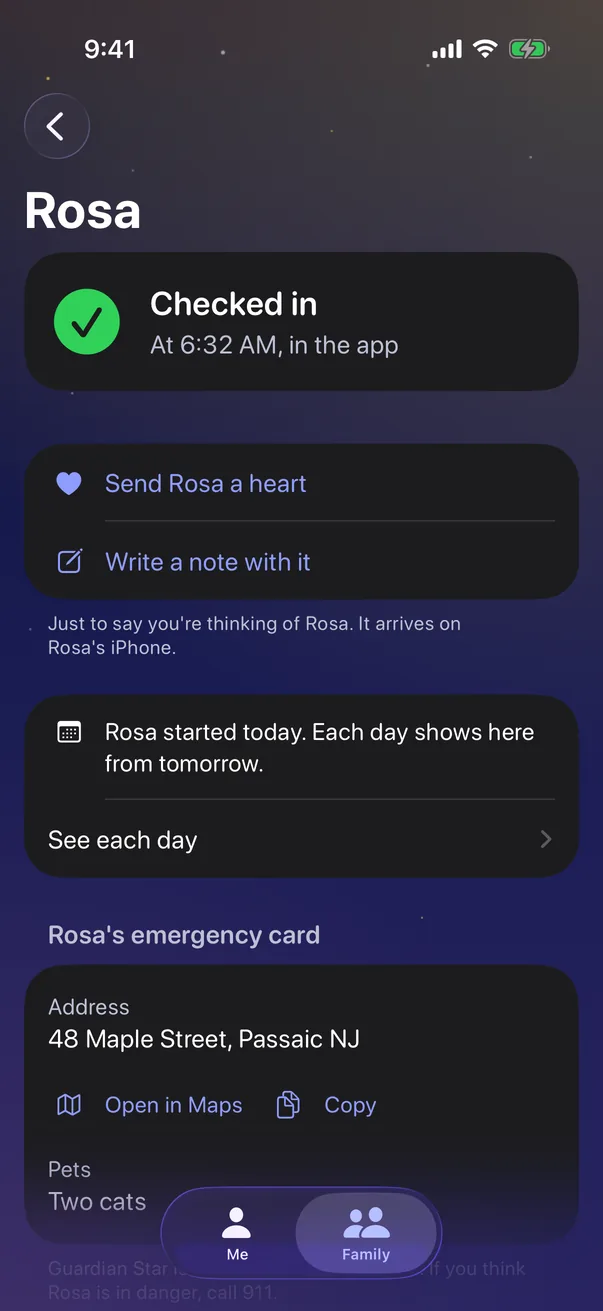
Guardian Star's Family screen: two people, each checked in this morning.
Your iPhone

2 of 5 · 0:06

If there’s no answer

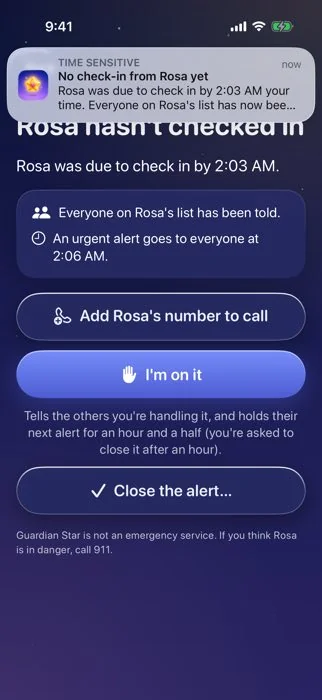
No sign by their check-in time? Their iPhone rings first, even on silent: “Are you OK?” If they still don’t answer, you’re told.
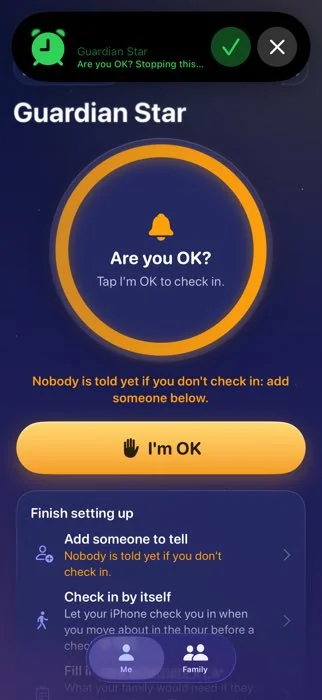
Guardian Star's alarm on the iPhone: Are you OK? Tap I'm OK to check in.
Their iPhone
On family's iPhone: No check-in yet, and the alert, with I'm on it.
Your iPhone

3 of 5 · 0:12

One tap: “I’m on it”

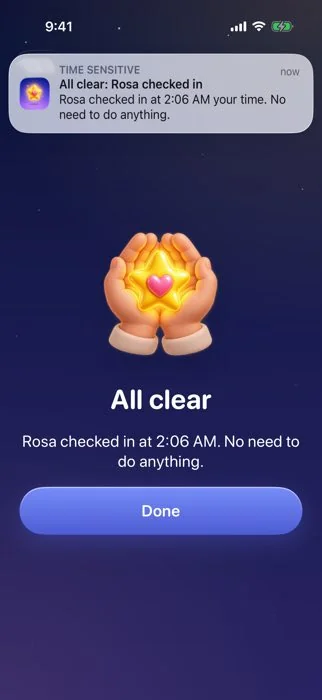
Whoever goes to look taps once. Everyone who’s told sees who’s on it, and hears the all clear when they check in.
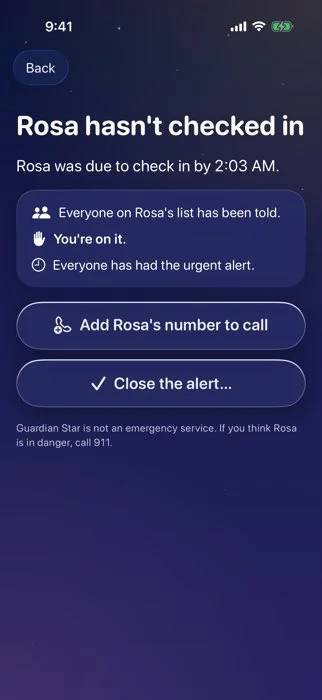
After I'm on it: You're on it. Everyone has been told.
You tap “I’m on it”
All clear: they checked in. No need to do anything.
Then: all clear

4 of 5 · 0:18

Set it up for them

Choose their check-in time on your iPhone and send them the link. On theirs, they tap “Yes, start” and allow what Apple asks. No codes, nothing to type.
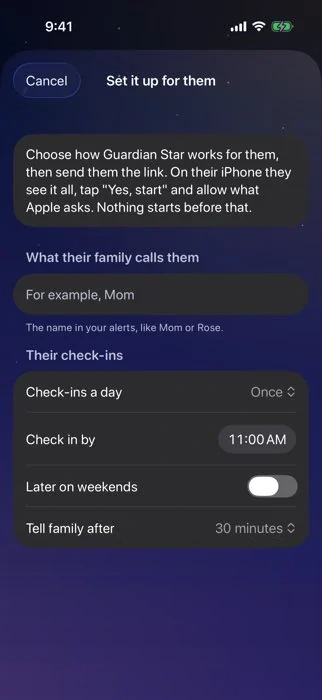
Set it up for them: their name, their check-in time, and when family is told.
Your iPhone
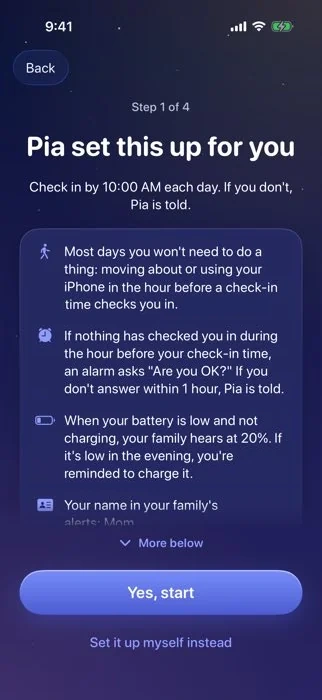
On their iPhone: set up for you. Check in by 10:00 AM each day. Yes, start.
Their iPhone

5 of 5 · 0:24

Give them Plus

Bought in the app, on your own Apple Account: up to 10 people told, family without the app told by email, or by text for those who ask, an emergency card, 90 days of check-ins, and more.
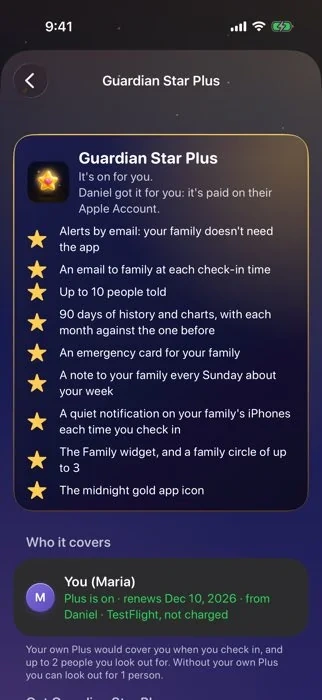
Guardian Star Plus, on for them: paid by family, on their own Apple Account.
Their iPhone
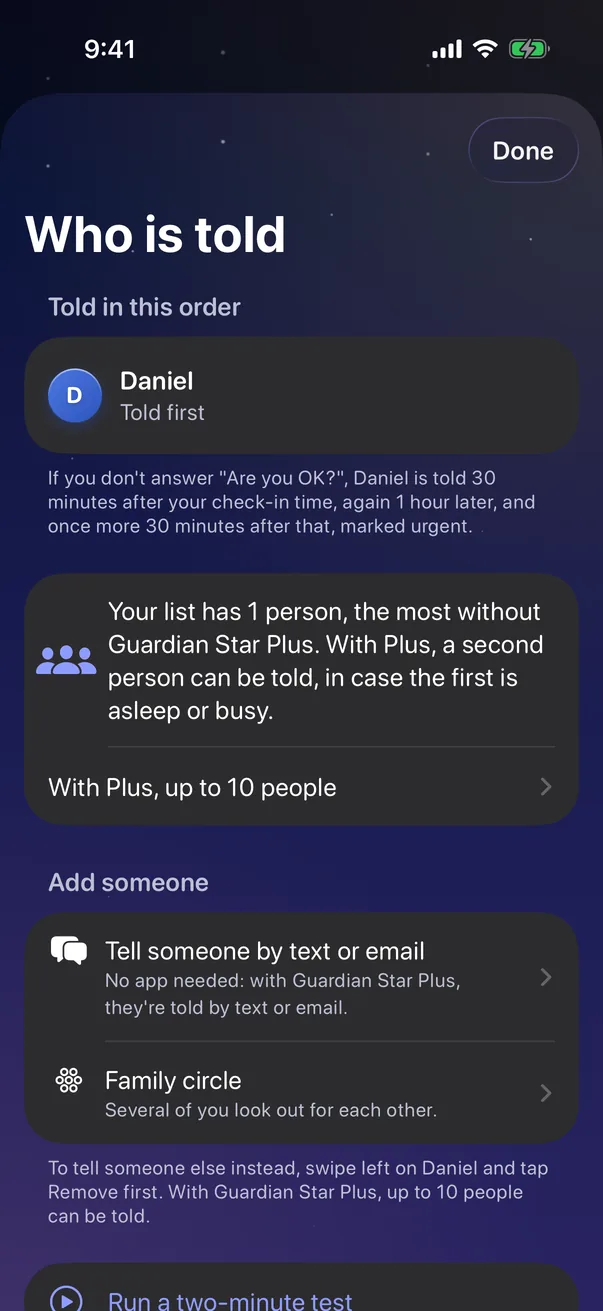
Who is told: one person without Plus, up to 10 with it.
Who is told
Get Guardian Star

Free, for iPhone with iOS 26 or later.

Why families use it

One quiet check-in a day, on top of your calls and visits. If one is missed, Guardian Star tells the people on their list.

Guardian Star's main screen: You're all set. Last active today, from using the phone.

Each day

Most days it checks in by itself

Moving about or using their iPhone in the hour before their check-in time counts. Nothing to remember.
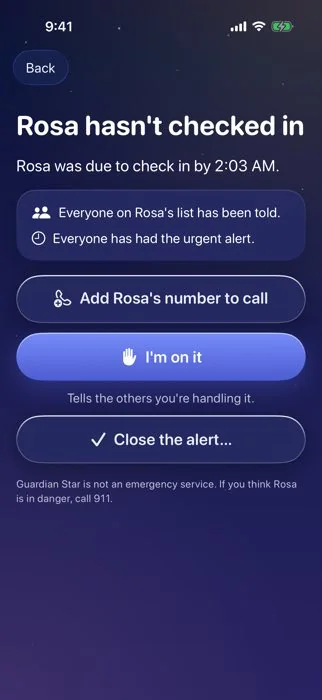
The alert on family's iPhone: hasn't checked in. Buttons: I'm on it, and Close the alert.

If there’s no answer

Their iPhone asks, then family is told

“Are you OK?” rings on their own iPhone first. If they still don’t answer, the people on their list are told, on their own iPhones.

After I'm on it: You're on it. Everyone has been told.

Whoever can help

One tap: “I’m on it”

Whoever goes to look says so. Everyone who’s told sees who’s on it, and hears when all is well.

Set it up for someone, in five minutes

From your own iPhone. They open the link, say yes, and allow what Apple asks.

  1. Choose their check-in timeand who is told if they don’t answer.
  2. Send them the linkOn their iPhone it opens Guardian Star with your plan. They tap “Yes, start” and allow what Apple asks.
  3. Get Plus for them, if you likeBought in the app on your own Apple Account, on the same form: it covers them as soon as they say yes.

How setting it up works

Set it up for them: their name, their check-in time, and when family is told.
Your iPhone
On their iPhone: set up for you. Check in by 10:00 AM each day. Yes, start.
Their iPhone
Guardian Star Plus, on for them: paid by family, on their own Apple Account.
Their iPhone, with Plus

Free, with Plus when you want it

Free for one person told. Plus for the whole family.

Checking in, the alarm and an alert in the app for one person on your list stay free. Plus tells up to 10 people, and reaches family and friends without the app.

Guardian Star

Free

  • Checked in by itself: your steps, your movement, using your iPhone.
  • Up to 3 check-in times a day, and the “Are you OK?” alarm.
  • One person on your list, told in the app, with I'm on it.
  • The live tracker, battery warnings, hearts, the I'm OK widget and Siri.
  • 7 days of check-ins.

Guardian Star Plus

$9.99 a month or $99.99 a year. Checking in, the alarm and an alert in the app stay free.

  • Alerts by email or by text (with a phone call when they're told), so family and friends are told without the app, iPhone or not: a brother, a neighbor, a friend nearby. A link in each lets them say they're on it. Texts go only to those who ask for them, and calls only to those told about them first.
  • A short text or an email at each check-in time to say you've checked in, if they'd like.
  • An emergency card for your people: your address, how to get in, who to call.
  • Up to 10 people on your list, told step by step, and 90 days of check-ins.
  • A note each Sunday about the week, the Family widget, and a family circle of up to 3.
  • One Plus covers you and the people you look out for. Without Plus you can look out for one person; with it, two, and room for more: $4.99 a month or $49.99 a year for each extra person.
  • Setting it up for someone? Get Plus on the same form, from your own iPhone: it covers them as soon as they say yes.

All about Guardian Star Plus

Please read

What Guardian Star can't do.

Guardian Star is a daily check-in. It helps you keep an eye out for each other, but it can't keep anyone safe on its own.

  • Guardian Star is not an emergency service. It can't detect falls, injuries or illness, and it never calls 911.
  • Alerts can be late or never arrive. It depends on iPhones, Apple, phone networks, the internet and our servers, and any of them can fail.
  • Don't rely on it alone. Keep other ways of knowing someone is OK: calls, visits, neighbors, a medical alert button.
  • In an emergency, call 911.

Guardian Star can't detect falls. If you wear an Apple Watch, turn on Apple's own Fall Detection: on your iPhone, the Watch app, then My Watch, then Emergency SOS, then Fall Detection, Always on. After a hard fall, if you don't respond, your Apple Watch calls 911 and texts the emergency contacts in your Medical ID (in the Health app): add your family there.
The terms say it in full